Windows 終端機使用 curl 發送 POST 請求
2023/02/08
萌芽站長
1,514 1
作業系統 , Windows
⚠️ 溫馨提醒:我們發現您可能啟用了廣告阻擋器,請將本站加入白名單以正常閱讀文章內容,謝謝支持 ❤️
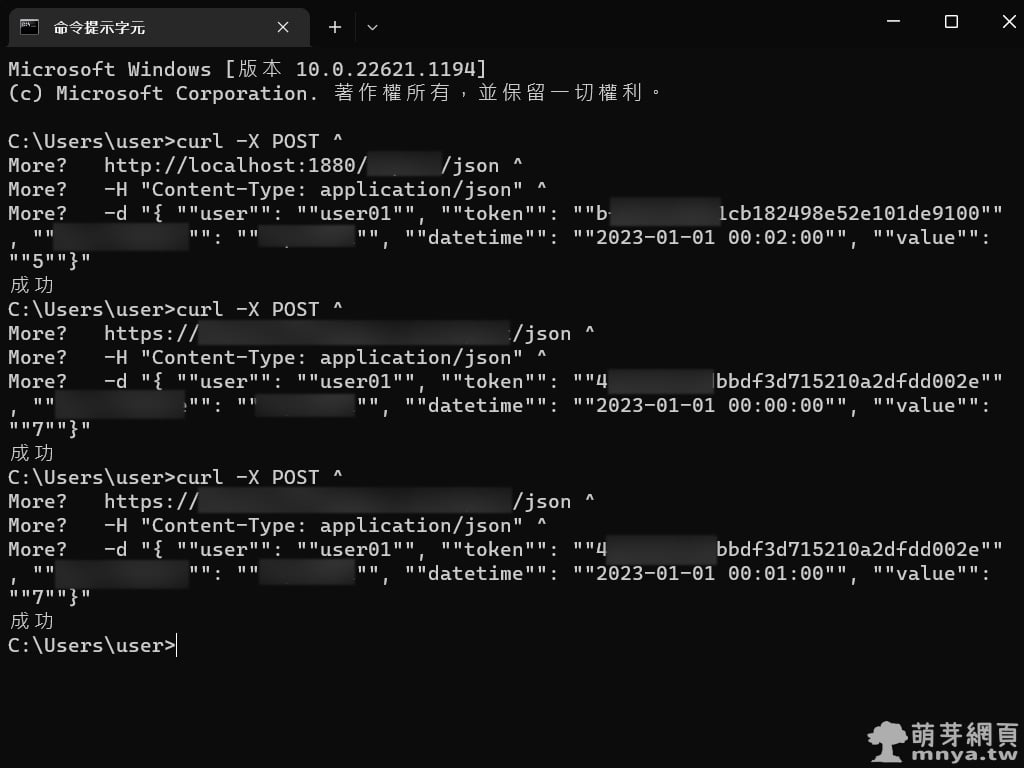
這邊教大家用 curl 在 Windows 終端機上發送 POST 請求,以測試 API 是否能正常回傳資訊。以下為示範:
curl -X POST ^
https://example.com/json ^
-H "Content-Type: application/json" ^
-d "{ ""user"": ""test"", ""token"": ""42364d7c67acd29c3c15ddf544c33671"", ""XXX"": ""YYY""}"
基本上就是把 URL 的部分改成你要的,-H 標頭已經幫忙設定為「Content-Type: application/json」,也就是發送 JSON 資訊,接著 -d 的部分就是整個要發送的 JSON 資訊囉!記得要用雙引號。

▲ 實際用上真的很方便,能直接用來測試 API 是否正常。
贊助廣告 ‧ Sponsor advertisements
Windows 安裝 WSL + Docker Desktop 完整教學
📆 2023-04-19
📁
軟體應用, 作業系統, 伺服器, Windows, Linux, Ubuntu
【Windows 98】初次嘗試使用記錄
📆 2014-07-14
📁
作業系統, Windows
【Windows 7】查看Windows體驗指數
📆 2014-07-27
📁
作業系統, Windows
Ubuntu:使用 ip route 與 nmcli 設定靜態路由的完整教學與差異分析
📆 2025-11-05
📁
作業系統, 伺服器, Linux, Ubuntu
Ubuntu:解決 sudo apt update 的警告提示 Key is stored in legacy trusted.gpg keyring
📆 2023-02-02
📁
作業系統, 伺服器, Linux, Ubuntu
【Windows 8.1】通知區域圖示
📆 2014-05-31
📁
作業系統, Windows
【Ubuntu 14.04 LTS】安裝Google地球教學
📆 2014-05-02
📁
作業系統, Linux, Ubuntu
關閉 Microsoft Store 應用商店自動更新
📆 2024-10-04
📁
軟體應用, 作業系統, Windows


 《上一篇》Telegram Desktop (桌面版) 4.6 之後全新的字型更換教學
  《下一篇》VTuber ランキング:查詢全球 VTuber 排行榜、搜尋 VTuber


留言區 / Comments
萌芽論壇