Windows Ink:螢幕繪圖,快速截圖並畫上筆記
2017/03/31
萌芽站長
2,308 2
作業系統 , Windows
⚠️ 溫馨提醒:我們發現您可能啟用了廣告阻擋器,請將本站加入白名單以正常閱讀文章內容,謝謝支持 ❤️
「Windows Ink」這個功能是給觸碰/手寫螢幕使用的功能,若為一般螢幕當然也可以使用這個功能,今天來介紹「螢幕繪圖」給大家,可以快速截圖,並立即編輯該截圖,如:裁切、繪圖、分享、存檔等等...,非常方便!

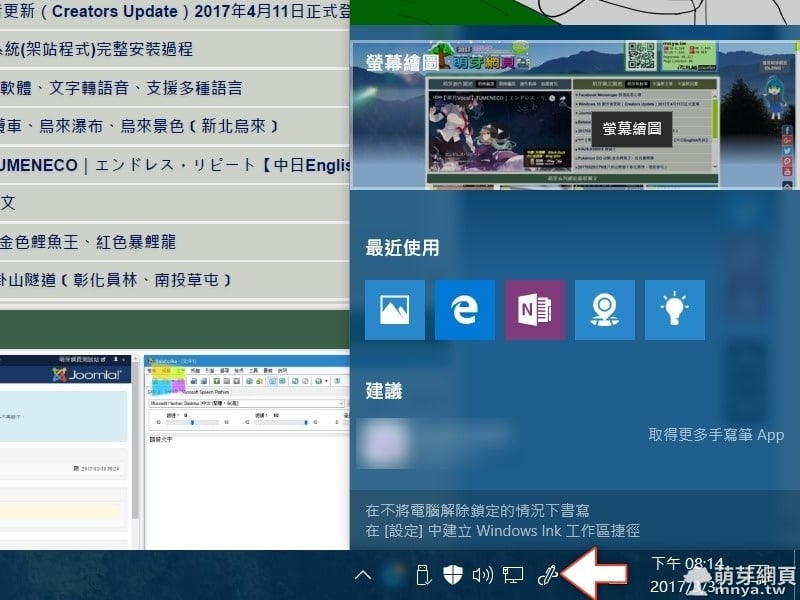
▲點 Windows Ink 在工作列上的捷徑 (若沒有,請於工作列上點滑鼠右鍵開啟選單,選「顯示 [Windows Ink 工作區] 按鈕」),接著點「螢幕繪圖」。
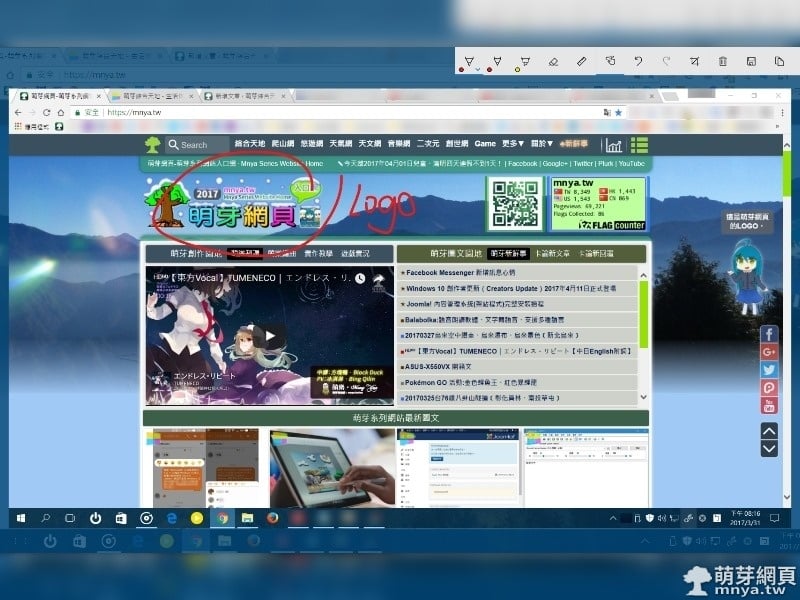
▲接著會顯示截圖結果,這時就可以開始編輯,最後當然就是儲存或分享啦!超方便的!
贊助廣告 ‧ Sponsor advertisements
Ubuntu:Apache 的啟動、停止與重新啟動
📆 2021-10-05
📁
作業系統, 伺服器, Linux, Ubuntu
【Windows】我的電腦幾核心?
📆 2013-01-01
📁
作業系統, Windows
【LXDE】運行於樹苺派,並執行 Minecraft
📆 2015-01-30
📁
作業系統, 電子DIY, LXDE
Apple Music:試用 3 個月後的完整心得!評價:音質表現優異、使用體驗待改善
📆 2020-01-13
📁
多媒體娛樂, 網路應用, 行動平台, 作業系統, 串流媒體, Windows, APP推薦, Android
【Windows 10】Microsoft 最新釋出 Build 10586
📆 2015-11-13
📁
作業系統, Windows
【Windows 7】調整資料夾欄位,方便查看檔案屬性
📆 2015-06-05
📁
作業系統, Windows
【Windows 8.1】通知區域圖示
📆 2014-05-31
📁
作業系統, Windows
VMware Workstation Player:匯出 Ubuntu 虛擬機成 .ovf 檔
📆 2023-10-18
📁
作業系統, 伺服器, Linux, Ubuntu


 《上一篇》Facebook Messenger 新增訊息心情
  《下一篇》Windows 10 創作者更新(Creators Update)搶先體驗!


留言區 / Comments
萌芽論壇